
Two-Step Verification
Protect a document with a one-time passcode sent to the signer's phone.
Advanced PlanTwo-step verification is available on the API Advanced Plan. You can try it in any sandbox app.
Add an authentication object to a recipient when you create an envelope. That signer has to enter a one-time passcode, sent to their phone by SMS, before they can open the document.
curl -X POST https://api.signeasy.com/v3/rs/envelope \
  -H "Authorization: Bearer $ACCESS_TOKEN" \
  -H "Content-Type: application/json" \
  -d '{
    "embedded_signing": false,
    "is_ordered": false,
    "sources": [{ "id": 23190242, "type": "original", "name": "Order form", "source_id": 1 }],
    "recipients": [{
      "recipient_id": 1,
      "first_name": "Jane",
      "last_name": "Doe",
      "email": "[email protected]",
      "authentication": {
        "type": "phone",
        "method": "sms",
        "country_code": "+1",
        "number": "2025550123"
      }
    }],
    "fields_payload": [{
      "recipient_id": 1, "source_id": 1, "type": "signature", "required": true, "page_number": "1",
      "position": { "mode": "fixed", "x": 100, "y": 100, "width": 150, "height": 50 }
    }]
  }'
It works the same way for emailed and embedded signing, and for originals and templates. Set it on each recipient who needs it. Recipients without authentication sign as usual.
The authentication object
authentication object| Field | Value |
|---|---|
type | phone |
method | sms. Any other value is accepted, but it turns the passcode off. |
country_code | The country calling code with the plus sign, such as +1 or +44. |
number | The phone number without the country code, as a string of digits, such as "2025550123". |
The API doesn't check the phone number. It accepts spaces, letters, and a country code without the plus sign. Validate the number in your app before you send it, because a signer with a wrong number can't open the document.
What the signer sees
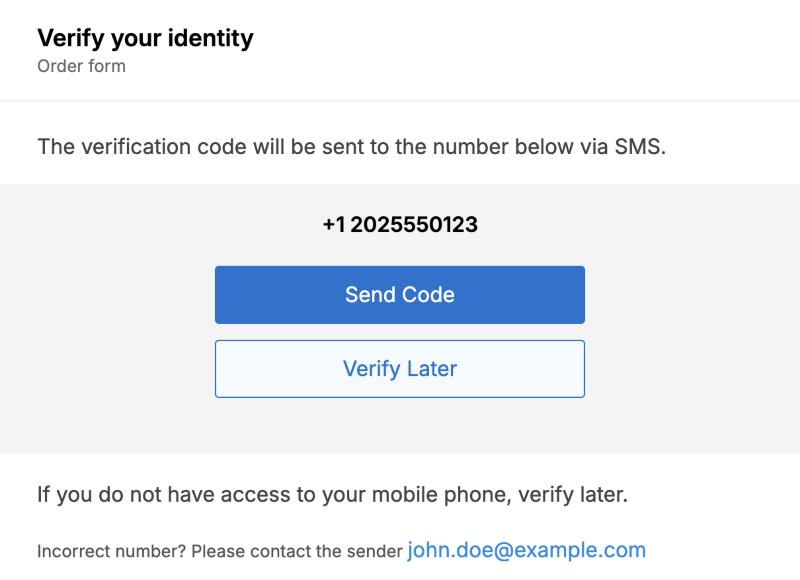
Before the document opens, the signer sees the full phone number you set. The code goes out only when they tap Send Code. If the number is wrong, the page tells them to contact the sender and shows the sender's email address.
If they tap Verify Later, they leave without opening the document. An emailed signer can come back through the signing email. For embedded signing, fetch a new signing URL when they're ready.
Check that it's on
Fetch an envelope returns 2fa_enable and otp_type on each recipient. The phone number comes back blank.
"recipients": [
  {
    "email": "[email protected]",
    "2fa_enable": true,
    "otp_type": "sms",
    "country_code": "+1",
    "phone_number": ""
  }
]
Errors
| Status | Body | Cause |
|---|---|---|
400 | {"message": {"authentication": "Invalid authentication in payload - Required field authentication.number is missing"}} | number is missing. |
400 | {"message": {"authentication": "Invalid authentication in payload - Required field authentication.country_code is missing"}} | country_code is missing, or authentication is an empty object. |
Changing the signer or the number
You can't change the phone number on an envelope you've sent. Cancel the envelope and send a new one.
Editing a signer turns two-step verification offIf you change a signer's name or email with Edit signer details, that signer no longer has to enter a passcode. To keep two-step verification, cancel the envelope and send a new one instead.
Updated about 2 hours ago